Showing posts with label Download. Show all posts

Tuesday, September 15, 2009

CCleaner - When Disk Cleanup is no longer enough

our site you can find a lot of articles with tips & tricks about how to speed up Windows Vista and how to have an enjoyable computer experience. One way to have a fast system is to keep it as "clean" as possible: with very little space occupied by temporary or unused files and with little or no invalid registry keys.

One way to achieve this is to use Disk Cleanup. However, this tool can clean only files and not registry keys. A better solution is to use CCleaner - a freeware optimization tool that cleans-up all unnecessary files & invalid registry keys.

CCleaner offers an impressive list of features: it can clean not only the usual unused or temporary system files but also files generated by very common applications such as internet browsers (Firefox, Opera, Safari), Microsoft Office, file archiving utilities, Nero, etc. Also, CCleaner checks your Windows registry for problems or inconsistencies and tries to solve them for you.

Good things

I found CCleaner to be a tool that's very easy to use. You just select the system components that you want to cleanup, click on Analyze, wait for the scan results to be returned and then click on Run Cleaner. Cleaning up the Windows Registry is just as easy - no expertise required.

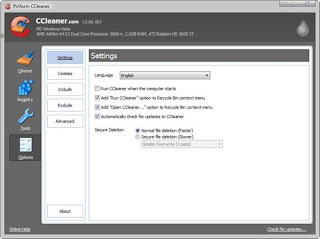
One very cool thing is the fact that you can add the Run CCleaner option to the Recycle Bin context menu. If you right click on the Recycle Bin and select this option, you will cleanup your system with one click. CCleaner will empty your Recycle Bin and also analyze your system and remove all the unused or temporary system files.
Another thing I like is the fact that one can easily remove any unwanted startup entries. Just select the undesired startup item and click on the Delete Entry button. It is as easy as that!


Things that could be improved

While working with it - the only thing that bothered me is the fact that, if you have User Account Control (UAC) enabled, you cannot install CCleaner by double-clicking on the setup file. You need to right click on it and select Run As from the contextual menu. If you don't do this, the setup will fail saying that it wasn't able to copy or update files. I'm sure this can be easily fixed in future versions.
Conclusion

CCleaner is an excellent tool. I've been using it for the last few months and I am very satisfied with it. Not only it does a great job at cleaning up your PC but it is also free. You should definitely give it a try. Download CCleaner


Saturday, September 12, 2009

Make Your Windows Genuine in Single Click


Make Your Windows Genuine in Single Click

This small tool make your windows XP genuine just in a single click. Why is this appearing again? In the last few weeks, I’ve seen many Windows XP users confronted with a window that pops up out of nowhere to install “Windows Genuine Advantage Notifications.”Windows Genuine Advantage is Microsoft's antipiracy tool, designed to identify pirated copies of Windows XP and make them irritating to use. It has no relevance to you and has nothing to do with security. WGA has been around for years and your computer has already passed this test – there’s no excuse for making you go through this again.

The software was actually downloaded as a “critical” update through the Automatic Updates system. You’re installing a new version of the WGA program with changes that are meaningless to you. There’s nothing new that justifies putting this in your face. Even worse, the installation fails a fair amount of the time.

So to be clear: the popup window about Windows Genuine Advantage is a legitimate Microsoft update and your computer will continue to annoy you until you install it. It’s not harmful. Go ahead and click Next. If you have trouble installing it the first time, download and install it manually.

The truly unforgivable thing is the checkmark inserted by default after installation in a box that says, "Show me more information about the joys of running licensed software." When you finish the WGA installation, your web browser takes you to a Microsoft anti-piracy web site.

An unexpected popup window, a vaguely described “update” out of nowhere, a rather bizarre trip to an irrelevant web site after installation - frankly, the whole experience resembles something I’d expect from a malware program, not from Microsoft.

Download the file from the link below, open the folder, doble click on the file "Microsoft Genuine Advantage Diagnostic", and wait for the popup that will show the result. That's it. you are done.


Win Rar - Info & Download Link


WinRAR is a powerful compression tool with many integrated additional functions to help you organize your compressed archives.

WinRAR puts you ahead of the crowd when it comes to compression. By consistently creating smaller archives, WinRAR is often faster than the competition. This will save you disc space, transmission costs AND valuable working time as well.

WinRAR supports all popular compression formats (RAR, ZIP, CAB, ARJ, LZH, ACE, TAR, GZip, UUE, ISO, BZIP2, Z and 7-Zip).

Features:

RAR (WinRAR), the powerful archiver and archive manager (Win32, Linux, Mac)

WinRAR is a powerful compression tool with many integrated additional functions to help you organize your compressed archives.

WinRAR puts you ahead of the crowd when it comes to compression. By consistently creating smaller archives, WinRAR is often faster than the competition. This will save you disc space, transmission costs AND valuable working time as well.

WinRAR supports all popular compression formats (RAR, ZIP, CAB, ARJ, LZH, ACE, TAR, GZip, UUE, ISO, BZIP2, Z and 7-Zip).
WinRAR is ideal for multimedia files. WinRAR automatically recognizes and selects the best compression method. The special
compression algorithm compresses multimedia files, executables and object libraries particularly well.

WinRAR allows you to split archives into separate volumes easily, making it possible to save them on several disks for example.
WinRAR is also ideal, if you are sending data through the web. Its 128 bit password encryption and its authenticated signature technology will give you the peace of mind you have been looking for.
WinRAR is a 32-bit Windows version of RAR Archiver, an archiver and archive manager. RAR files can usually compress content by 8 percent to 15 percent more than ZIP files can. WinRAR?s main features include strong general and multimedia compression, the ability to process non-RAR archive formats, ZIP compression and decompression, support for long filenames, programmable self-extracting archives (SFX), repair of damaged archives, authenticity verification, embedded file comments, and encryption.

Unicode is supported in archive filenames, allowing non-English filenames to be handled painlessly. You can manipulate the parameters of many archives at once and view a volume sequence as a single archive. WinRAR can convert other archive formats to RAR and search for specified text and files in archives.
It's Winrar 3.80 Professional pre activated. No Keygen needed. Just unzip and Go!


Five basic guidelines to download

Five basic guidelines to download

Never downloaded programs before? We show you how, and what you should do to keep your download experience happy.

Your friend uses an application that makes assignments seem like a breeze or your colleague collects brownie points with boss by creating jazzy presentations. Well, stop fretting because you too can become the boss’s favorite. Just download applications from the Internet that help simplify your task.

The installation process of the software you download could be different for different computers, operating systems or browsers, but you just need to keep these five simple guidelines in mind.

Step One

Make a directory for downloads by right-clicking anywhere on the Windows desktop. This helps keep your desktop and hard drive mess-free, and grants easy access to all your downloads.

Step Two

Find the software that you want on the Internet and download. Usually all sites have a download link. Once you click on this link, a box pops up which gives you the option to Run, Save or Cancel the download. Click on the Save option and save the file in your download folder on the desktop.

Step Three

Most files that you download from the Internet are compressed. This reduces the download time considerably and helps in keeping all the files related to the program - like help files and drivers – together in a single file. Unzip the file using a program like WinZip. Files with the extension EXE are generally self-extracting files that decompress by double-clicking it. The installation in this kind of files start automatically after which you can skip directly to step 5.

Step Four

The next step is installation. You can look for the Install or Setup file from the folder you have unzipped the files into. WinZip can also detect the Install or Setup program contained in a ZIP file. While decompressing, it creates a button called Install in the WinZip button bar. Click this Install button, and let WinZip do the rest. Follow the instructions as they come up.

During install, the program will ask questions on the location where you want to install the software, and what program you want to add it to. Choose the default settings unless you have more knowledge or have a personal preference. Creating a desktop icon will give you easy access to the program.

Step Five

Once you have the program up and running, you don’t need the downloaded compressed file anymore. You can delete it.