Friday, January 29, 2010

When you can't find your Cell Phone


Wheresmycellphone.com

What do you do when you can't find your cellphone in your house but you don't have a landline or another phoe handy to call it and track it down? Wheresmycellphone.com provides a simple solution: just enter your cell number on the free sute, and it calls the cell number for you.

The site does not keep or share numbers, so your only worry will be whether you set the phone silent before misplacing it.

Thursday, January 28, 2010

Web Publishing with FileMaker and PHP


Web Publishing with FileMaker and PHP
English | 2007 | 432 pages | PDF | 5,4 MB


Whether you are a FileMaker developer who is new to web publishing, a web developer who is new to FileMaker, or a complete beginner looking to put your data online, this book is for you.
In Part I, you learn the basics of how web publishing works and how to write your own HTML and PHP.
In Part II, you learn how to build a FileMaker database and install and configure the FileMaker Server to host the database. In Part III, you learn how to put it all together to create web pages that talk to your database and allow people to view the data and, if you like, modify it. Throughout the book, publishing a FileMaker Product Catalog to the web is used as an example. Each chapter builds on the previous chapter. When you are done, you will have a working website!
Detailed information on how to…
Master web publishing
Read and write basic HTML
Read and write basic PHP
Build a FileMaker database
Install and configure FileMaker Server
Publish your FileMaker data to the web
Work with portals and container fields
Repurpose your FileMaker layouts on the web


Wednesday, January 27, 2010

ASP.NET 3.5 Social Networking


ASP.NET 3.5 Social Networking
PDF | 580 pages | 28.78 MB

This book shows how to build a scalable, enterprise-ready social network using ASP.NET. The book uses the latest features of ASP.NET to provide a platform that is efficient, easy to maintain, and extensible. Whether you want to build your own social network, are developing a social site for a customer or employer, or just want a practical guide to developing complex ASP.NET applications then this book is ideal for you.


Monday, January 25, 2010

AutoCAD 2007 and AutoCAD LT 2007 Bible


AutoCAD 2007 and AutoCAD LT 2007 Bible
PDF | 1297 pages | 13,9 mb

Popular among both novice and experienced AutoCAD users, this comprehensive book begins with an overview of the basics of AutoCAD, such as creating drawings, using commands, and specifying coordinates. Coverage becomes more in-depth as each chapter builds off the previous one, with discussions of 2D and 3D drawing techniques, using layers, creating dimensions, 3D coordinates, and rendering.

Youll learn to customize commands and toolbars; program AutoCAD using AutoLISP and VBA; and review AutoCAD LT. A “Quick Start” will have beginners creating a CAD drawing on their first day. The accompanying CD-ROM provides before-and-after real-world drawings, bonus appendices, freeware and shareware programs, the book in searchable PDF format, and a 30-day trial version of AutoCAD software.


Seven Tips & Tricks For Windows 7

Shuffling Through Program Windows. If you’re running a number of files from the same program, such as multiple documents in Microsoft Word, Windows 7 allows you to switch through these windows with ease. Simply press down on the Ctrl key while clicking the icon from the taskbar. Each click will change the window to the next in the sequence, in the order that
you opened them.
Managing Your Windows. Windows 7 simplifies document and program management by allowing you to “dock” a window or manipulate its size with one mouse maneuver or a simple keystroke. To dock your window on one half of the screen, drag it to the left or right and it will change its size to fit that half of the screen. To manipulate the vertical size of a window, drag the window to the top to maximize it, or double-click the window’s top or bottom border to maximize it vertically while keeping the same width.

You can also perform all of these functions with keystrokes:
W7+Left Arrow and W7+Right Arrow dock to half the screen
W7+Up Arrow and W7+ Down Arrow maximize and minimize
W7+Shift+Up Arrow and W7+Shift+Down Arrow maximize
and restore vertical size.
W7 = windows emblem left bottom corner of your screen
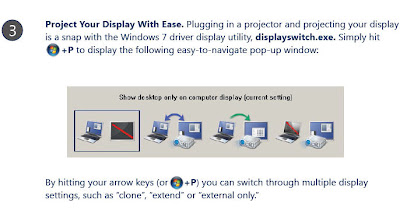
Project Your Display With Ease. Plugging in a projector and projecting your display is a snap with the Windows 7 driver display utility, displayswitch.exe. Simply hit w7+P to display the following easy-to-navigate pop-up window: By hitting your arrow keys (or w7+P) you can switch through multiple display settings, such as “clone”, “extend” or “external only.”
W7 = windows emblem left bottom corner of your screen
Multi-Monitor Window Management. Windows 7 makes using multiple monitors as convenient as it should be. When you’re working in multi-monitors, use the keyboard shortcuts w7+Shift+Left Arrow and w7+Shift+Right Arrow to toggle between monitors. The new window
will keep its relative position to the top-left origin of the original.
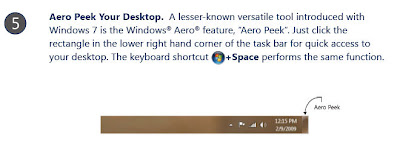
Aero Peek Your Desktop. A lesser-known versatile tool introduced with Windows 7 is the Windows® Aero® feature, “Aero Peek”. Just click the rectangle in the lower right hand corner of the task bar for quick access to your desktop. The keyboard shortcut w7+Space performs the same function.
Live Clutter-Free. We live with enough clutter in our lives. Windows 7 gets rid of all the superfluous windows behind your active window. Just hit w7+Home to minimize all inactive windows. To restore the windows when you’d like them, just press w7+Home again.
Help the Help Desk Help You. Solving problems unique to a machine can be an arduous task for both the end-user and the help desk. That’s why Windows 7 introduces the Problem Steps Recorder, a screen-capture tool that allows the end-user to record the problems they’re having step-by-step. It’s as simple as hitting “record” then adding in comments as needed. A HTML-based file is converted to a .ZIP folder, which is easily passed on to the help desk.
The program is accessible from the Control Panel under “Record steps to reproduce a problem” or run psr.exe from Explorer.


Friday, January 22, 2010

HTML Professional Projects


HTML Professional Projects
PDF | 752 pages | 18.75 MB

No other book on HTML offers a project-based approach for higher-end users. This project-oriented approach gives you hands-on exercises that you can apply in the real world. "HTML Professional Projects" focuses on developing four types of Web sites: corporate intranet, e
-commerce, non-profit/ government-related, and public relations. Rather than simply describing the tags and symbols used in HTML, the author will indoctrinate you to the idea that before one line is coded, the underlying business process is being considered.


Thursday, January 21, 2010

The Ultimate iPod Guide 5


The Ultimate iPod Guide 5
English | 148 pages | PDF | 52.30 Mb


Stylish, cutting edge and packed with exclusive multi-media features, the iPod is a favourite with young and old alike. This updated fifth title in the best-selling iPod series contains expert guides and reviews to the latest iPod and iTunes features, ranging from help with creating and sharing playlists to DJing with your iPod. Colour coded and divided into clear sections relating to technical ability, this guide provides all iPod users the knowledge they need to master their iPod.